Dear Community Members,
As a reminder, Little Miami School District will continue using the Raptor Safe mobile app as part of our ongoing commitment to enhancing school safety and streamlining visitor management in our schools. The app remains an important part of our visitor management process, providing a convenient, secure, and efficient way for visitors to verify their identity and check in at our schools.
What is the Raptor Safe App?
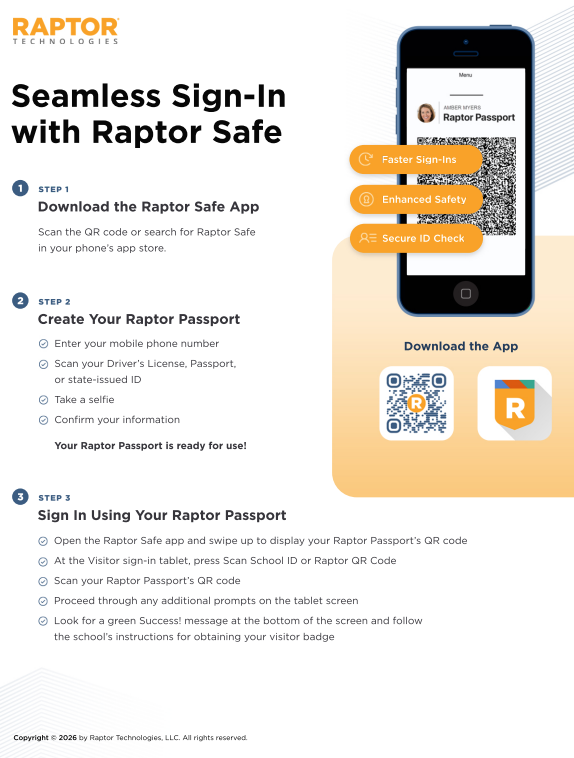
The Raptor Safe app offers a convenient and secure way for visitors to manage and verify their identity before arriving at a school. With the Raptor Passport feature, visitors can pre-verify their identity, allowing for a seamless sign-in process when they arrive on campus.
How Does It Work?
When visiting a school, visitors can use their secure QR code generated by the app to expedite the check-in process. QR codes automatically regenerate every 5 minutes to ensure security and prevent misuse.
Getting Started
The Raptor Safe app is available to all visitors across the district. To download the app, please visit https://raptortech.com/raptorsafe-app/. For directions on the app setup process, please refer to the Raptor “School Community Resources” page in the link. Please direct any additional questions to the Director of Safety at josmith@lmsdoh.org. Thank you for helping us keep our schools safe. Sincerely, Joseph Smith Director of Safety Little Miami School District